
Purpose
Learn how finished production runs are confirmed in IndustryX Suite ERP: declaring completed good units and scrap, conducting quality control audits against engineering specifications, and receiving finished inventory into stock.
Instructions
- Navigate to Manufacturing > Job Shop > Mass Complete Task or open the active Production Job.
- Select the completed routing operation and enter actual produced quantity, rejected scrap, and operator work hours.
- Click Confirm Job to post operational completion.
- Navigate to the Quality Control (QC) module.
- Select Start Inspection; choose Inspection Type:
In-ProcessorFinal, and link the Production Job/Batch number. - In Define Parameters, review required test criteria: dimensions, weight, physical tolerances.
- In Record Observations, input measured values from shop-floor test instruments.
- Evaluate inspection outcome: verify Pass/Fail status within tolerance bands.
- Click Generate QC Report to approve inspection clearance.
- Receive accepted finished goods into designated warehouse inventory storage bins and close the production order.
Expected result
Finished goods are received into stock inventory, quality release is approved, and production job costs reconcile from WIP to finished goods inventory.
Downstream effects
Received finished goods become Available to Promise (ATP) for customer sales orders (30000) and dispatch fulfillment (32000).
Related guides
Continue to 54000: GST and E-Invoice or view 52000 with screenshots.
Instructions
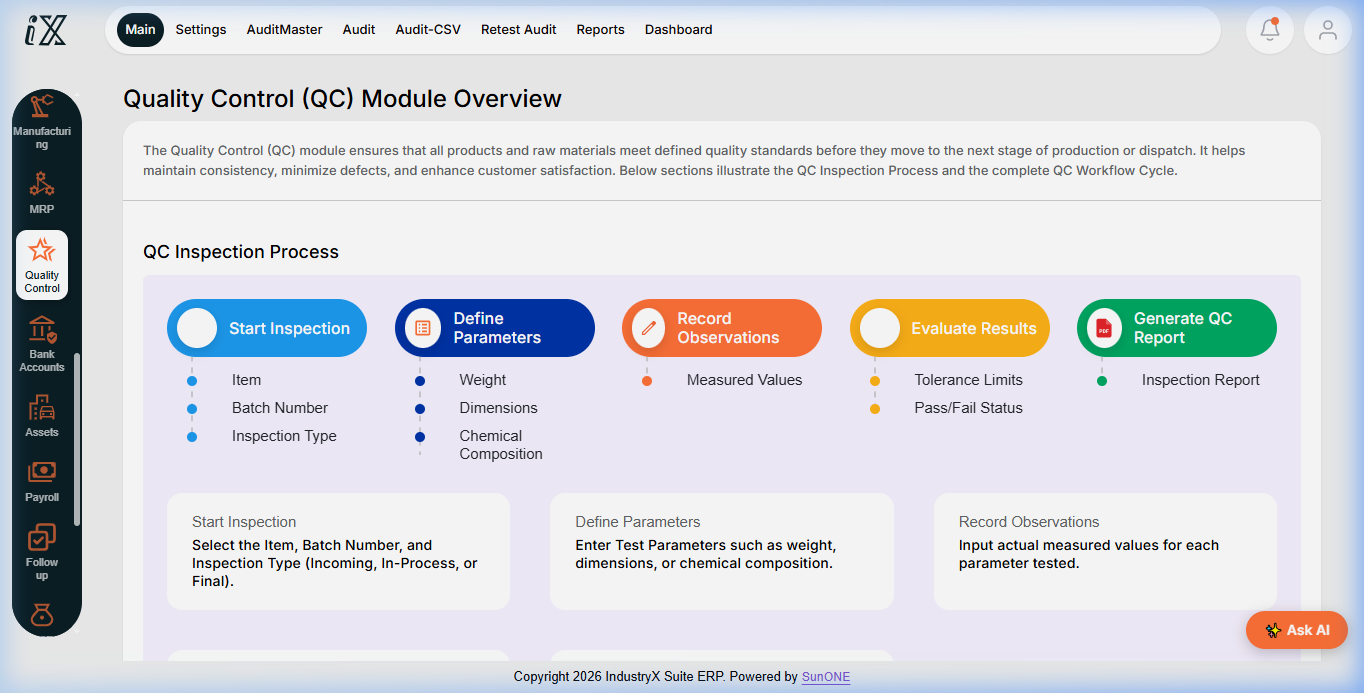
- Navigate to Quality Control (QC) Module Overview to review the 5-step inspection lifecycle.
- Use Start Inspection to initiate QC auditing against production batches.
- Record measured observations against defined engineering tolerance bands.
- Generate QC inspection reports to certify finished goods for inventory intake.
Downstream effects
Approved quality inspections release production output to finished inventory ledgers and enable sales fulfillment.
Related guides
Read text instructions or proceed to 54000: GST and E-Invoice.