
Purpose
Learn how manufacturing jobs (work orders) are created, scheduled, released to the shop floor, and how raw material components are physically and systemically issued from warehouse stores to work-in-progress (WIP).
Instructions
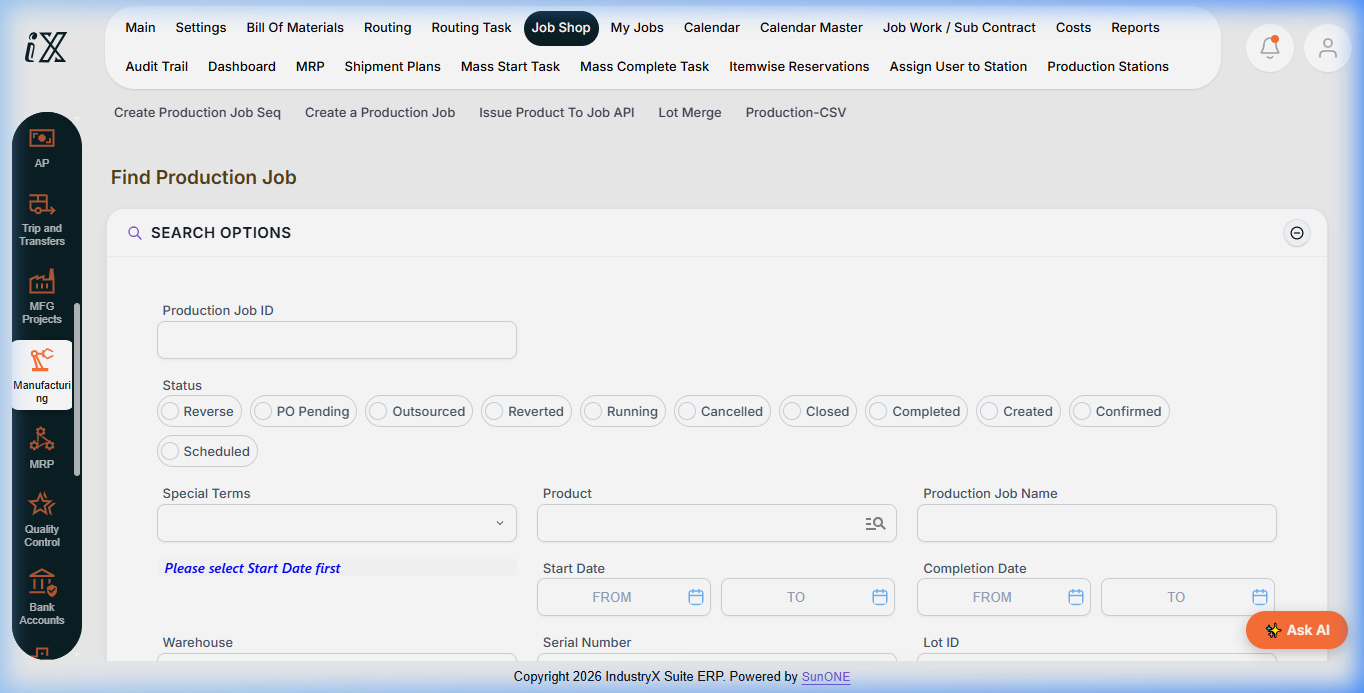
- Navigate to Manufacturing > Job Shop > Find Production Job.
- Use search options to filter production jobs by Status (
Created,Confirmed,Scheduled,Running,Closed). - Click Create a Production Job to define a new production order.
- Select the Finished Good product, Production Facility (Warehouse), planned Quantity, and Start Date.
- Verify the attached Bill of Materials and Routing tasks; confirm component availability.
- Transition job status from
CreatedtoConfirmed/Scheduled. - Assign the job to target production work centers and operators.
- Select Issue Product To Job API to execute the material staging issue.
- Select the source warehouse storage bin and confirm physical issue of component lots.
- Verify job status updates to
Runningwith issued components reflected in WIP cost ledgers.
Expected result
Production job transitions to Running, components are deducted from store inventory and debited to WIP, and shop floor tasks are active.
Downstream effects
Active production orders are tracked through operational task milestones, leading to job confirmation, quality inspection, and finished good receipt in Confirm and Inspect Production (52000).
Related guides
Continue to 52000: Confirm and Inspect Production or view 50000 with screenshots.
Instructions
- Navigate to Manufacturing > Job Shop > Find Production Job.
- Use Search Options to filter jobs by status (Created, Confirmed, Scheduled, Running, Closed).
- Click Create a Production Job to define new work orders and attach BOM/routing versions.
- Use Issue Product To Job API to release materials from warehouse stores to shop floor WIP.
Downstream effects
Releasing production jobs locks scheduled capacity at work centers and debits inventory components into Work-in-Progress (WIP).
Related guides
Read text instructions or proceed to 52000: Confirm and Inspect Production.