
Purpose
Learn how warehouse operations fulfill customer sales orders in IndustryX Suite ERP: generating picklists, verifying item quantities, packing goods, generating shipment records, and posting the final dispatch.
Instructions
- Navigate to Warehouse > Shipments or open fulfillment from the approved Sales Order.
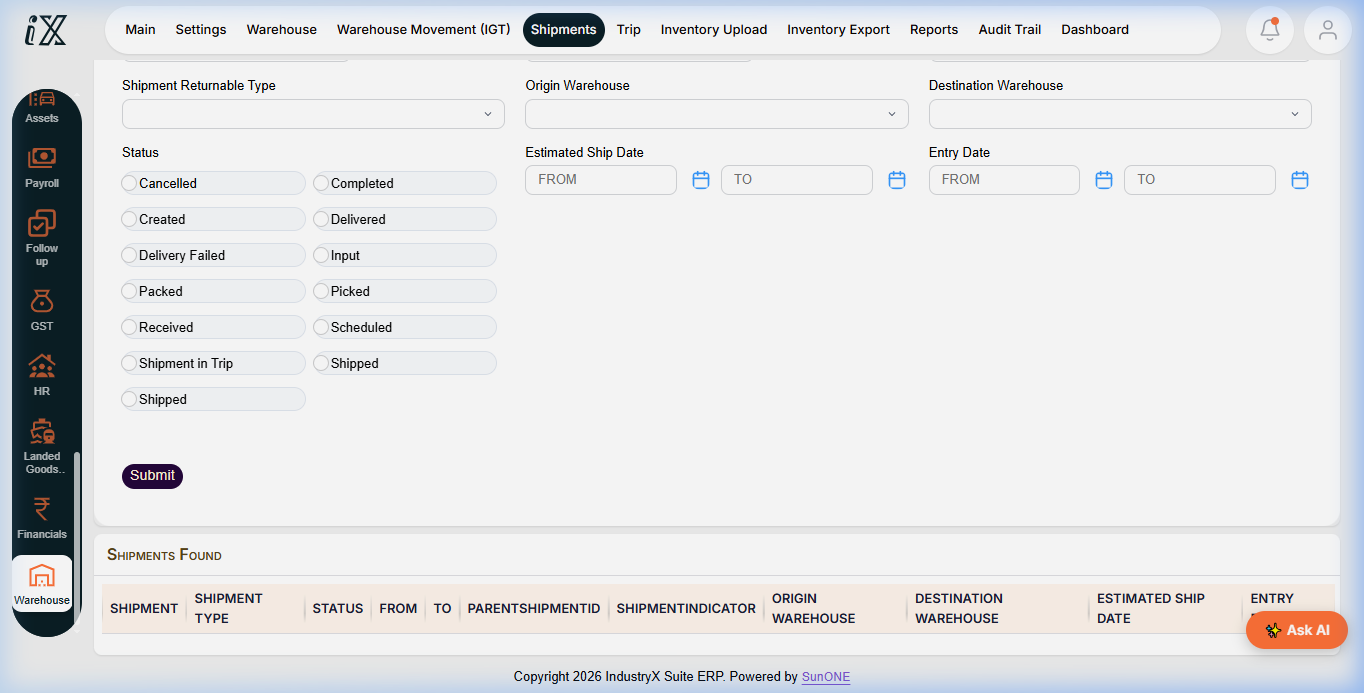
- Use search filters (Origin Warehouse, Status:
Created,Scheduled,Picked,Packed) to find orders ready for dispatch. - Generate or review the picklist for the target sales order, verifying source location bins and quantities.
- Execute item verification at the packing station; record package dimensions, weight, and carrier details.
- Open the Shipment record and review destination address, carrier tracking number, and line item contents.
- Confirm the dispatch action. Verify the shipment transitions to
Shipped. - Confirm inventory balances decrement at the source facility and verify the Sales Order status updates to
Completed/Shipped.
Expected result
Shipment is recorded with status Shipped, physical inventory is deducted from stock ledgers, and the sales order is unlocked for customer invoicing.
Downstream effects
The completed shipment feeds Accounts Receivable for sales billing, invoice generation, and customer payment processing in Invoice a Customer and Record Payment (34000).
Related guides
Continue to 34000: Invoice a Customer and Record Payment or view 32000 with screenshots.
Instructions
- Navigate to Warehouse > Shipments to access fulfillment order queues.
- Use status filters (Created, Picked, Packed, Shipped) to monitor outbound consignments.
- Select an outbound shipment, complete verification, and confirm final dispatch.

Downstream effects
Confirmed shipment releases physical goods from inventory and creates the unbilled shipment queue in Accounts Receivable.
Related guides
Read text instructions or proceed to 34000: Invoice a Customer and Record Payment.