
Purpose
Learn how auxiliary acquisition costs (freight, customs duties, clearing, transport insurance) are capitalized into material inventory valuation in IndustryX Suite ERP: selecting purchase invoices, allocating charges proportionally across received items, and posting adjusted cost ledgers.
Instructions
- Navigate to Landed Goods Cost Module Overview from the main navigation sidebar.
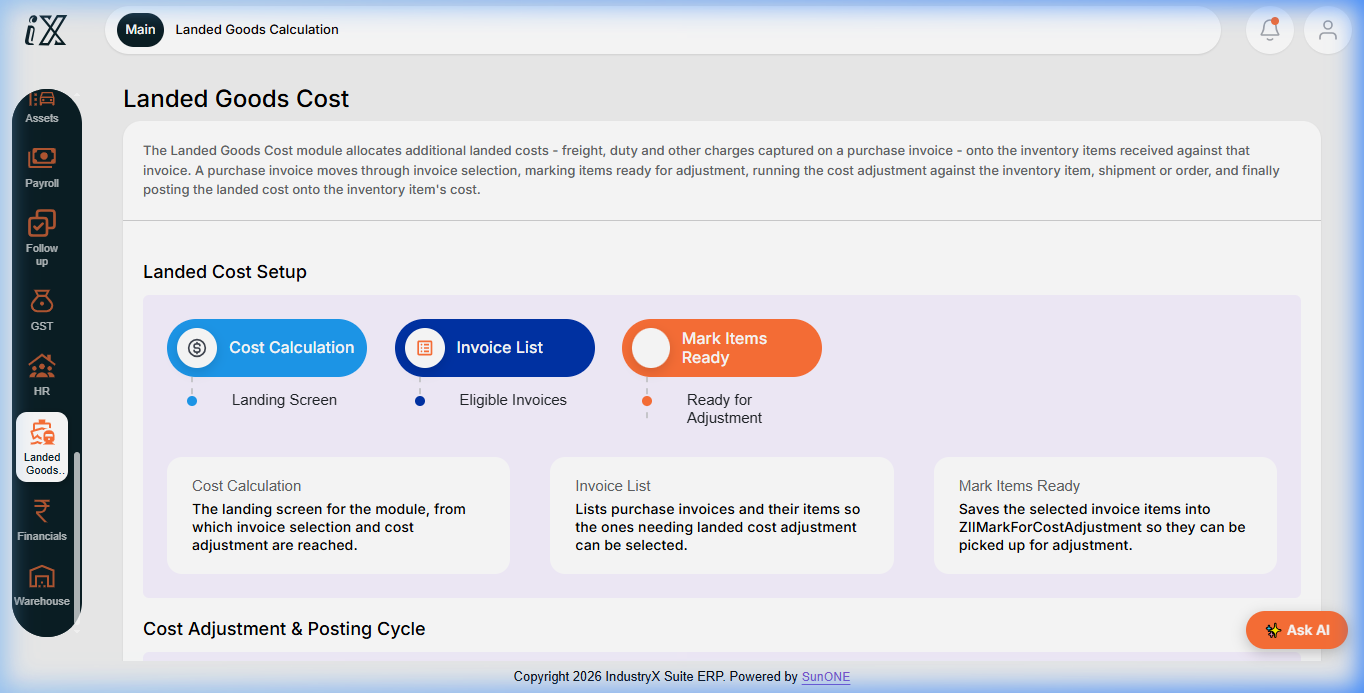
- Review the Landed Cost Setup process: Cost Calculation (landing screen), Invoice List (eligible invoices), and Mark Items Ready.
- Select Invoice List to display purchase invoices with ancillary freight, duty, or handling line items.
- Choose the candidate invoice and inspect the received inventory items linked to the order/shipment.
- Select the allocation basis: Proportional by Value, Weight, Volume, or Equal Unit Quantity.
- Execute Mark Items Ready to queue items for the cost allocation run.
- Navigate to Landed Goods Calculation to review calculated cost adjustment deltas per inventory unit.
- Submit the allocation run. Verify that the unit cost of received inventory items updates to include full landed costs.
- Inspect the resulting General Ledger adjustment: verify debit to Inventory Asset and credit to Freight/Duty Clearing Accruals.
Expected result
Ancillary purchase costs are absorbed into physical item inventory valuation, ensuring accurate Cost of Goods Sold (COGS) reporting upon future consumption.
Downstream effects
Landed cost adjustments update product inventory item valuation ledgers without altering vendor payable settlement amounts.
Related guides
Continue to 60000: Bank Transaction and Reconciliation or view 58000 with screenshots.
Instructions
- Navigate to Landed Goods Cost module overview to inspect the landed cost capitalization process.
- Review the 3-step Landed Cost Setup: Cost Calculation, Invoice List, and Mark Items Ready.
- Select eligible purchase bills with freight/duty items and allocate charges against received inventory lines.
- Execute Landed Goods Calculation to post unit cost additions onto inventory item valuation ledgers.
Downstream effects
Landed cost allocation absorbs freight, duty, and handling into product inventory unit cost for accurate valuation and COGS determination.
Related guides
Read text instructions or proceed to 60000: Bank Transaction and Reconciliation.