
Purpose
Learn how to manage internal bank/financial accounts, enter or import electronic bank statement entries, and match cleared transactions against system payment and receipt vouchers to maintain cash accuracy in IndustryX Suite ERP.
Instructions
- Navigate to Accounting > Financial Accounts to view active company bank and cash accounts.
- Select the company operating bank account (e.g. Current Account - INR) to review current ledger balance versus reconciled bank balance.
- Open Bank Reconciliation or Reconcile Account from the accounting sub-navigation.
- Enter the statement period opening date, closing date, opening balance, and closing statement balance from the sample bank statement.
- Review the candidate list of uncleared payments (disbursements) and customer receipts (deposits).
- Match corresponding entries by checking the line item box when reference, date, and net amount agree.
- If an unexplained variance exists, investigate timing differences or unrecorded bank charges (e.g. processing fees); do not force a zero variance by writing off unexplained differences.
- Save and finalize the reconciliation run once the cleared balance matches the ending statement balance.
Expected result
The bank reconciliation status updates to Reconciled, all matched checks and electronic transfers are marked Cleared, and outstanding in-transit items remain visible for subsequent period monitoring.
Downstream effects
Accurate bank reconciliation provides real-time cash flow visibility, prevents duplicate payments, and supports statutory financial audit reporting.
Related guides
Review 58000: Allocate Landed Cost, proceed to 62000: Create Project and WBS, or view 60000 with screenshots.
Instructions
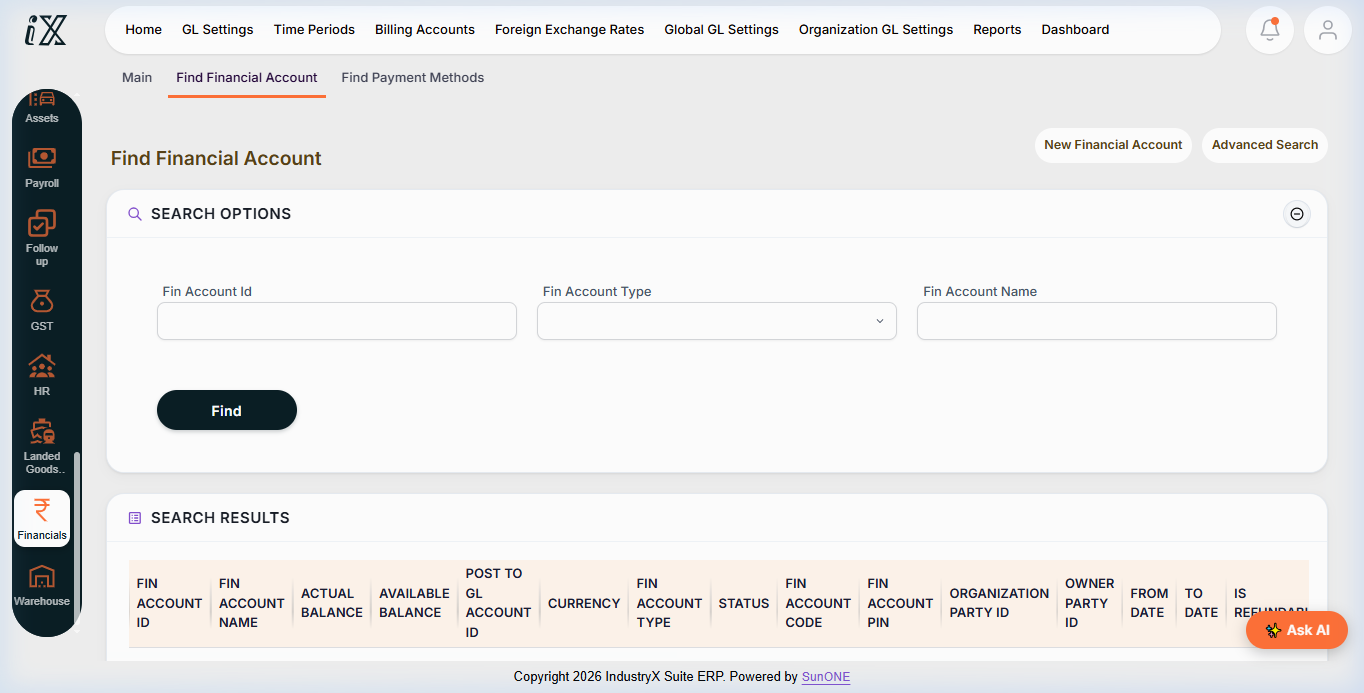
- Navigate to Accounting > Financial Accounts to locate active company bank and cash accounts.
- Select the appropriate operating account to view balance, account type, currency, and organization owner.
- Open Bank Account details and Reconciliation workspace.
- Match open payments and deposits against external statement records.
Downstream effects
Accurate clearing records safeguard cash flow, ensure treasury visibility, and maintain general ledger synchronization.
Related guides
Read text instructions or proceed to 62000: Create Project and WBS.