
Purpose
Learn how customer returns and credit notes are processed in IndustryX Suite ERP: authorizing returns against original shipments, tracking returned goods back into warehouse inventory, and issuing accounts receivable credit notes or replacement orders.
Instructions
- Navigate to Accounts Receivable > Credit Note / Customer Return.
- Use search options to locate existing return authorizations or credit notes.
- Click Create New Credit Note for Customer to initiate return processing.
- Select the Customer party and search the original shipped Sales Order line item.
- Specify the returned quantity, return reason (e.g., defective, wrong specification, transit damage), and return response (Credit Memo, Replacement, Refund).
- When returned goods arrive at the warehouse, navigate to Warehouse > Receive Return to inspect items and restock or scrap.
- Review the generated Credit Note; verify reversal of original GST / tax calculations and update to customer account balance.
Expected result
Return authorization is completed, warehouse inventory is adjusted, and a matching credit note adjusts customer ledger balances.
Downstream effects
Credit notes offset accounts receivable balances and reverse output GST liabilities in the tax ledger.
Related guides
Continue to 38000: Customer Portal and Ecommerce Order or view 36000 with screenshots.
Instructions
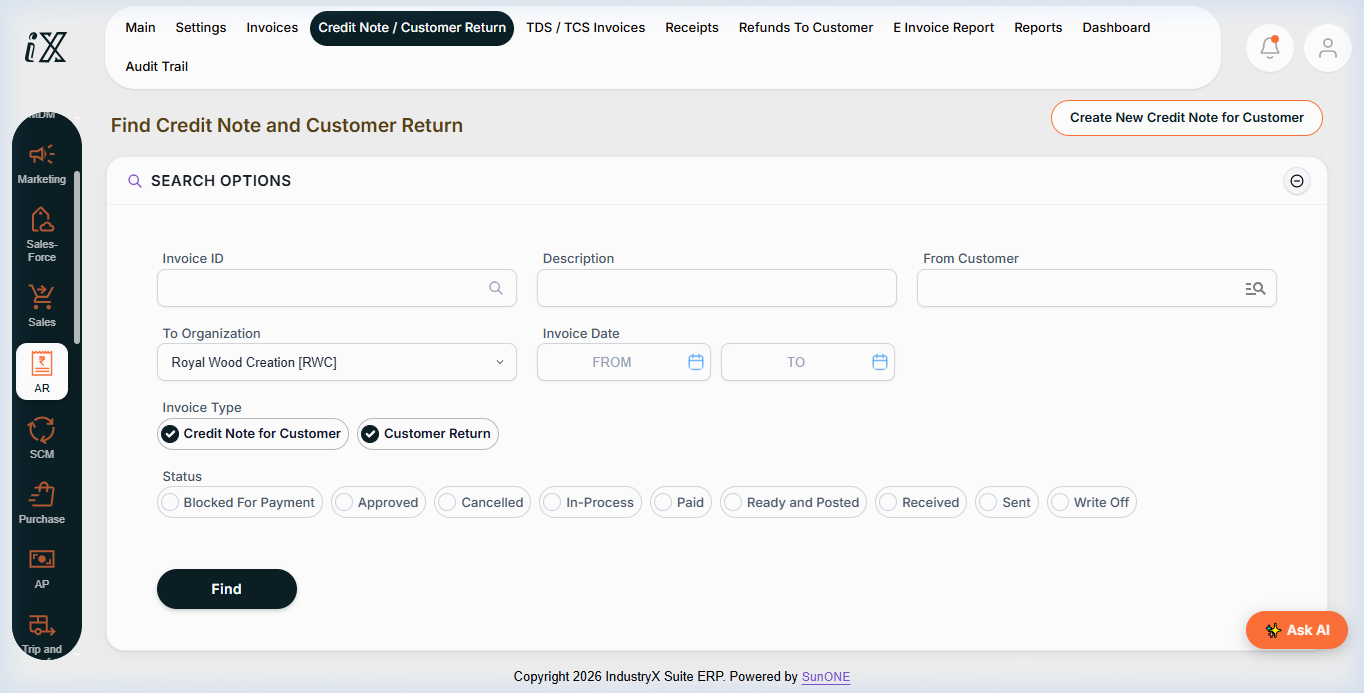
- Navigate to AR > Credit Note / Customer Return.
- Use Search Options to locate return requests by customer, status, or date range.
- Click Create New Credit Note for Customer to initiate return processing against an eligible invoiced order.
Downstream effects
Customer return processing adjusts stock upon warehouse receipt and applies credit adjustments against customer accounts receivable balances.
Related guides
Read text instructions or proceed to 38000: Customer Portal and Ecommerce Order.