
Purpose
Learn how periodic stock counts, cycle counts, and inventory adjustments are conducted in IndustryX Suite ERP: comparing physical counts against system records, recording variance reasons, and posting audited adjustments.
Instructions
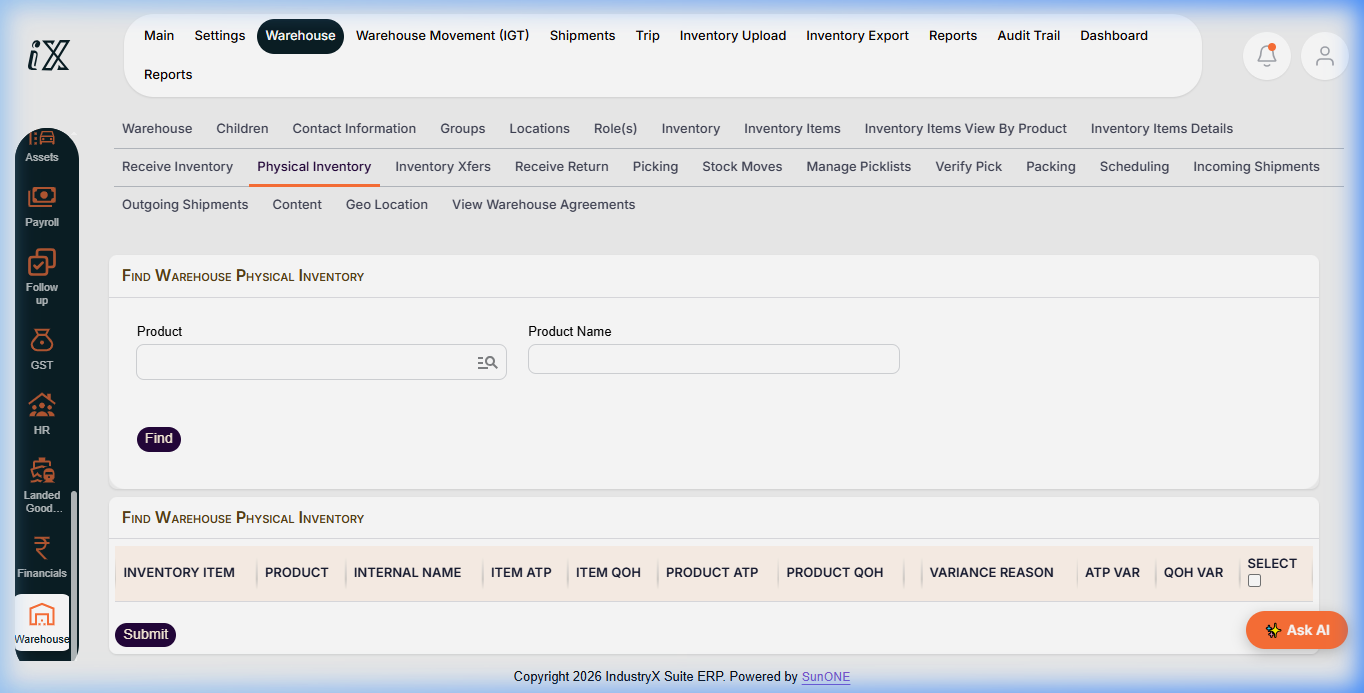
- Navigate to Warehouse > Physical Inventory for the target facility.
- Use search options (Product, Product Name) to locate the inventory items being audited.
- Click Find to display current book inventory: Item ATP, Item QOH, Product ATP, Product QOH.
- Conduct the physical bin verification and record observed counts against book values.
- In the variance table, select the appropriate Variance Reason code (e.g. damaged goods, cycle count discrepancy, obsolescence).
- Enter the ATP / QOH variance adjustment values.
- Select the item checkboxes and click Submit to record the adjustment.
- Verify the updated stock balance reflects the verified count and an audit trail log is captured.
Expected result
System stock balances match verified physical counts, and inventory adjustment write-offs or gains are documented with audit reasons.
Downstream effects
Inventory adjustments post cost variances to the General Ledger and impact MRP replenishment planning calculations.
Related guides
Continue to 44000: Trace Stock from Source to Issue or view 42000 with screenshots.
Instructions
- Navigate to Warehouse > Physical Inventory.
- Use search options to locate inventory lines for physical auditing.
- Inspect system book balances (ATP, QOH) against observed bin quantities.
- Select variance reason, input variance adjustment values, and click Submit.
Downstream effects
Physical inventory adjustments reconcile physical reality with ERP book balances and post inventory variance journals to financial accounts.
Related guides
Read text instructions or proceed to 44000: Trace Stock from Source to Issue.